

Good bots to use at start
You don't need to install 20 bots right away. Better to pick a few that solve clear problems. Every bot adds complexity and potential security risks.
Don't add bots just because they look interesting. Every bot gets permissions on your server, a misconfigured or compromised bot can delete channels, hand out bans or leak information. Add only what you need and give them the minimum permissions required.
Recommended starter pack (phase 1)
In the first phase you don't need more than 2 bots. The best starting point:
| Bot | What it's for | Link | Setup tutorial |
|---|---|---|---|
| Dyno | moderation, automod, logs, autoroles and verification, covers almost everything you need at the start on its own | dyno.gg | docs.dyno.gg · video tutorial |
| Ticket Tool | a ticket system for private support (account, purchases, sensitive bugs) | tickettool.xyz | docs.tickettool.xyz – Setup |
Dyno replaces several bots on its own. With Dyno + Ticket Tool you already have moderation, automod, logs, autoroles, verification and a support system, that's almost everything you need at launch. The rest of the bots below are for when you genuinely need to expand.
Useful bot categories (for later)
| Bot type | Well-known examples | What it's for |
|---|---|---|
| Moderation / AutoMod | Dyno, Carl-bot, MEE6, AutoMod (native) | warn / mute / kick / ban, word filters, auto-moderation |
| Verification | Dyno, Wick, captcha bots | confirm users on entry, block bots and automated accounts |
| Ticket support | Ticket Tool, Tickety | create private support channels "on demand" |
| Reaction roles | Carl-bot, Dyno, Reaction Roles | users self-assign roles by clicking an emoji/button |
| Logs | Dyno, Logger | log message deletions, bans, joins/leaves, role changes |
| Announcements / webhooks | native webhook, dedicated bot | post patch notes or announcements automatically (e.g. from a build pipeline) |
| Anti-spam / security | Wick, Dyno, AutoMod (native) | block spam, raids, unwanted links and invites |
Many "big" bots (Dyno, Carl-bot) cover several categories on their own: moderation + logs + reaction roles + automod. Often 2-3 well-chosen bots solve almost everything without crowding your server.
What you want to be able to do from the start
- verify users on entry;
- block spam and raids;
- create support tickets;
- log message deletions, bans and role changes;
- assign roles automatically (reaction roles);
- post patch notes or announcements;
- separate beta testers from the rest of the community.
Ticket support, in practice
A ticket bot (e.g. Ticket Tool) gives you a "Create ticket" button. The user clicks it, the bot creates a private channel visible only to them and staff, and you can add a clear template (category, platform, build version, description, steps to reproduce).
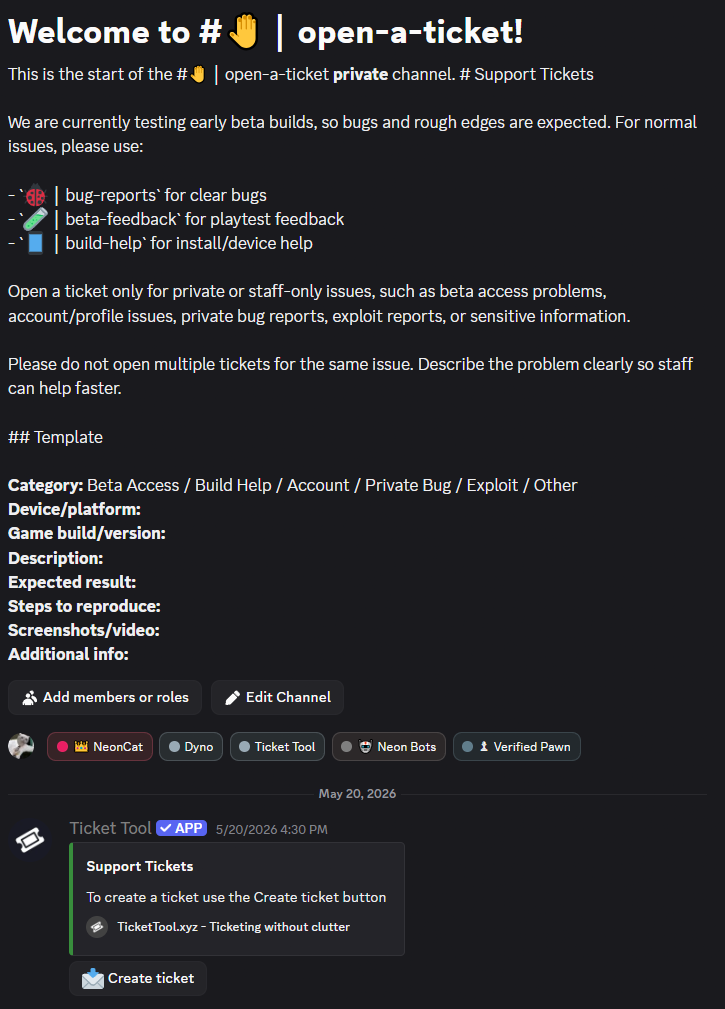
The ticket template saves you half of the support work: if the user fills in platform, version and steps to reproduce from the start, you solve the problem much faster.
Mind the permissions and security
Never give Administrator to a bot unless absolutely necessary. Give it only the permissions it needs (e.g. a logs bot needs to read the audit log, not to manage the server). Check the bot's reputation before adding it, use well-known bots, with many users and an official site.
- Add bots only from their official sites or from Discord's App Directory.
- Place bots high in the role hierarchy only if they need to moderate, but below human staff roles where possible.
- Periodically review which bots are still active and remove the unused ones.
How you grant permissions to bots and the rest of the roles is detailed in Roles and settings.